Pixel Gun 2: FPS Gameplay, Touch Controls and Multiplayer Modes on Android and iOS
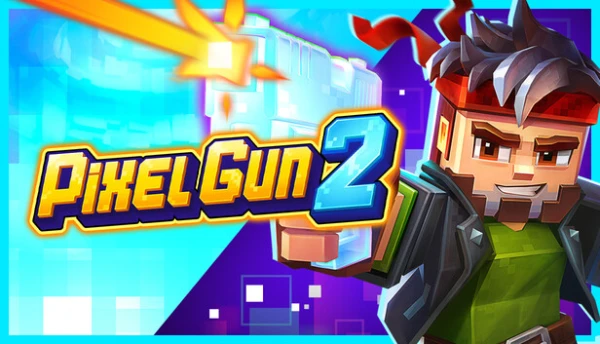
Pixel Gun 2 brings Cubic Games’ blocky first-person shooter series back to mobile with faster battles, destructible arenas and a stronger focus on team-based competition. Released worldwide for Android and iOS on 7 September 2026, the sequel builds on the foundations of Pixel Gun 3D while introducing new characters, weapons, gadgets and environmental destruction. Its short multiplayer matches are designed around quick decisions, accurate aiming and adapting to changing surroundings. For mobile players, understanding the touchscreen controls, combat mechanics and available game modes is particularly important, as success depends on considerably more than choosing a powerful weapon.
Pixel Gun 2 Gameplay: What Makes the Mobile FPS Different?
Pixel Gun 2 is a competitive first-person shooter developed by Cubic Games, the studio responsible for Pixel Gun 3D. The original game became known for its distinctive block-based graphics, large weapon collection and accessible multiplayer battles. The sequel retains that recognisable visual identity but introduces a different approach to combat. Matches take place in environments that can change as players fight, with destructible structures affecting movement, visibility and defensive positions. Rather than relying on familiar routes throughout an entire match, participants must continually reassess the battlefield and decide whether to attack, retreat or find another position.
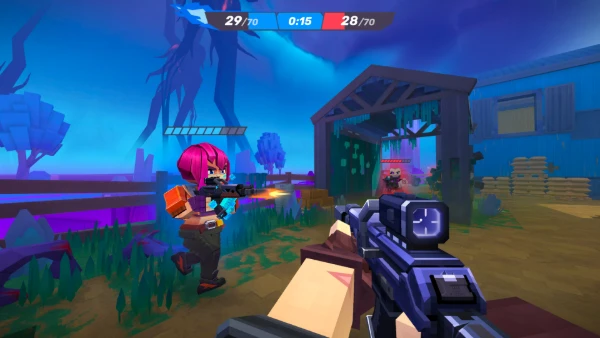
The central multiplayer experience is built around short, action-heavy encounters. Team Fight, the main competitive mode, features two teams of five players competing to achieve the highest elimination score. A typical match lasts approximately five minutes, although it can finish earlier when a team reaches the required score. Players return to the arena after being eliminated, keeping the action moving without lengthy interruptions. This structure makes Pixel Gun 2 suitable for relatively brief gaming sessions, while its combat mechanics still demand concentration. Accurate shooting, effective movement and cooperation with teammates become increasingly important as opponents learn to exploit the available weapons and changing terrain.
Environmental destruction is one of the sequel’s defining features. Parts of an arena can be damaged or destroyed during combat, meaning cover that initially protects a player may disappear before the match finishes. This changes how familiar shooter tactics work. Remaining behind the same obstacle for too long can become dangerous, particularly when opponents have weapons capable of breaking defensive structures. Conversely, destroying an obstacle may expose an enemy or create a more direct line of fire. Successful players need to consider their surroundings alongside their ammunition, health and positioning. The game’s colourful graphics make these battles visually distinctive, but their underlying challenge comes from recognising opportunities and reacting quickly.
Weapons, Characters and Destructible Arenas
Pixel Gun 2 allows players to experiment with different combinations of heroes, weapons, gadgets and abilities. Instead of treating equipment as a collection of interchangeable items, the game encourages players to consider how individual components support a particular approach to combat. A weapon suited to close-range encounters may work better for an aggressive player who moves frequently, while equipment designed for more controlled engagements can favour someone who prefers maintaining distance. Gadgets and character abilities introduce additional choices, particularly when trying to escape difficult situations or support teammates. There is no single equipment combination that guarantees success in every match, because the arena, opponents and selected game mode influence which approach works best.
Choosing equipment requires attention to practical factors such as effective range, firing behaviour and opportunities to use abilities. Players who frequently miss moving targets may benefit from practising with a weapon they can control consistently before experimenting with more demanding alternatives. Similarly, an effective combination should remain useful when opponents approach from unexpected directions. The most expensive or visually impressive item is not necessarily the most appropriate choice for every situation. Pixel Gun 2 includes equipment progression and rewards, so players can gradually expand their options rather than attempting to obtain every available weapon immediately. Testing different combinations during ordinary matches is a useful way to identify strengths without concentrating exclusively on competitive results.
Destructible arenas make movement particularly important. Traditional defensive positions are less dependable when opponents can damage the surrounding structures, and players must pay attention to alternative routes. A narrow passage might offer protection from one direction while leaving someone vulnerable to attacks from another. Open spaces provide better visibility but can expose players to several enemies simultaneously. When advancing with teammates, it is often safer to maintain enough distance to avoid becoming an easy group target while remaining close enough to provide support. These principles apply across the game’s maps, including the Pool arena introduced during its September 2026 global launch. Learning where fights commonly occur can improve decision-making, although the changing environment prevents every encounter from following the same pattern.
Touch Controls and Performance on Android and iOS
Playing Pixel Gun 2 on a smartphone requires a different approach from using a keyboard and mouse. The mobile version relies on touchscreen interaction for moving, looking around, aiming, firing and activating combat actions. Players must coordinate several movements within a relatively small display, often while opponents are moving or attacking from different directions. This makes familiarity with the controls particularly valuable. A player who understands weapon behaviour but struggles to aim while moving may lose engagements that would otherwise be manageable. Spending time getting comfortable with the touchscreen layout can therefore make a noticeable difference, especially during the faster exchanges that characterise the game’s multiplayer battles.
The basic approach to touchscreen shooting involves separating movement and aiming between the hands, allowing the player to change direction while maintaining visual contact with an opponent. Moving too aggressively can make aiming harder, whereas standing still produces an easier target. Practising controlled movements helps establish a balance between accuracy and survival. Players should also become familiar with the locations of firing, jumping and ability controls so that essential actions do not require searching around the screen. Small improvements in hand positioning and timing can be more useful than repeatedly changing equipment. The developer confirmed that external controller support was not available at the mobile launch, making effective use of touchscreen input especially relevant for the initial release.
Performance also affects how responsive combat feels. According to the official Pixel Gun 2 system requirements, Android 10 or later and iOS 16 or later are the minimum operating-system recommendations, alongside 4 GB of RAM and approximately 3–5 GB of available internal storage. The developer recommends 6 GB of RAM or more, additional storage space and a stable internet connection for a better experience. Actual performance depends on the device and software version, so meeting the minimum specifications does not guarantee consistently smooth gameplay. Players experiencing interruptions should close unnecessary background applications, check available storage and verify that their internet connection is stable before starting competitive matches. Compatibility information should also be checked against the appropriate app-store listing.
Improving Aim, Movement and Mobile Shooting Accuracy
Reliable aiming begins with learning how quickly the camera responds to finger movements. Sensitivity settings, where available, should allow players to turn comfortably without repeatedly overshooting their targets. Extremely rapid camera movement can make small corrections difficult, particularly when an opponent moves across the screen at close range. Slower movement may provide greater precision but can become restrictive when several enemies appear from different directions. A practical approach is to keep settings consistent across several matches before deciding whether an adjustment is necessary. Practising against moving opponents, rather than concentrating only on stationary targets, helps develop the coordination required for actual multiplayer encounters.
Movement is equally important because Pixel Gun 2 rewards players who avoid predictable behaviour. Running directly towards an opponent can make movement easy to anticipate, while constantly jumping without considering the surroundings may reduce shooting accuracy. It is generally more effective to change direction deliberately, use temporary cover and avoid remaining in exposed positions after firing. Players should also learn when to disengage. An opponent with a clear positional advantage may be difficult to defeat in a direct exchange, making a different route or support from a teammate the better choice. These decisions become particularly valuable in destructible arenas, where the safest available path can change during a single confrontation.
Connection stability deserves attention alongside personal technique. Pixel Gun 2 requires an internet connection because its principal modes involve online competition. The official requirements identify a stable connection of at least 20 Mbps as a minimum recommendation, although download speed alone does not determine multiplayer responsiveness. High latency, packet loss and unstable wireless coverage can cause delayed reactions or interruptions during matches. A consistent Wi-Fi connection may be preferable to an unreliable mobile signal, depending on local conditions. Players should also avoid large downloads running in the background during gameplay. When performance problems continue, checking the game’s current version and reporting persistent technical issues through the official support service provides a more reliable solution than assuming every problem comes from the touchscreen controls.
Pixel Gun 2 Multiplayer Modes, Team Play and Progression
Multiplayer competition is the main focus of Pixel Gun 2, with several modes offering different objectives. Team Fight centres on cooperation between two groups of five players. Each enemy elimination adds one point to the team’s total, and the match ends when a side reaches the score limit or the timer expires. Players who are eliminated return after a short delay and receive temporary spawn protection, preventing opponents from immediately eliminating them again. The system also recognises individual contributions through personal scores, including eliminations, assists and other combat achievements. While securing eliminations remains important, the mode rewards players who understand how to support teammates, avoid unnecessary risks and maintain pressure on opponents.
Deathmatch offers another competitive option and also contributes to the game’s weekly ranked competition. Bounty Hunter introduces a different objective by assigning a special target to each team. Eliminating an ordinary opponent earns regular points, but defeating the opposing team’s marked player awards five points. This creates an additional tactical choice: pursue the marked opponent for a larger reward or continue securing safer eliminations elsewhere. The marked player receives additional health but becomes visible to opponents through walls, making coordinated defence important. Teams that ignore their own marked player can surrender valuable points quickly. Bounty Hunter therefore places greater emphasis on choosing targets, protecting teammates and responding to changes in the match objective.
Playing with friends is supported through the Squads feature. Players can create or join a squad from the lobby, invite friends and enter matchmaking together once the members are ready. The squad leader selects the game mode and starts matchmaking, while the group remains together after a completed battle. This removes the need to rebuild the same group after every match and makes regular team play more convenient. Squad members can also receive additional rewards, including Coins and experience points. For groups trying to improve their results, communication and consistent roles can be more valuable than everyone using a similar approach. Coordinating attacks, covering exposed routes and protecting vulnerable teammates helps prevent individual mistakes from affecting the entire team.
Ranked Matches, Rewards and Long-Term Progression
Pixel Gun 2 includes a weekly ranking system connected to regular multiplayer activity. Ranked Matches become available through Trophy Road progression, after which eligible players are automatically included in a leaderboard. Rating points, known as Cups, can be earned through Team Fight and Deathmatch. Individual performance contributes to the amount received, while winning a Team Fight match provides a multiplier to the earned Cups. Deathmatch offers a slightly increased Cup reward, and leaving a match early prevents players from receiving rating points for that battle. Rankings operate over seven-day periods, with rewards distributed according to the final standings. Cups reset when a new weekly competition begins, giving participants another opportunity to improve their position.
Outside ranked competition, Pixel Gun 2 provides structured objectives through its Task Hub and seasonal Pixel Pass. Rookie Challenges introduce important mechanics such as equipping weapons, using abilities and improving characters. Daily Tasks provide five objectives that refresh each day, with a Daily Lootbox available for completing the full set. Weekly Tasks follow a similar structure but offer longer-term goals and corresponding rewards. The Pixel Pass adds seasonal progression through a free reward line and an optional premium line. Players earn progression experience by participating in matches and completing relevant tasks. This gives regular play an additional purpose without requiring every session to focus exclusively on winning competitive matches.
Pixel Gun 2 is free to download on Android and iOS, although optional in-app purchases are available. The game launched globally on mobile in September 2026, while the PC edition remained in development without a confirmed release date in the developer’s post-launch announcement. Shared progression between mobile and PC has been announced through Cubic ID, but the availability of individual features should be checked against the current release rather than assumed from future plans. For new players, the most useful starting point is to learn the touchscreen controls, complete introductory challenges and become familiar with Team Fight before concentrating heavily on rankings. Understanding the objectives of Bounty Hunter, experimenting with equipment and playing alongside friends can then provide a broader experience of the game’s competitive systems.